RPM Work Mode v2.4.4.5 for FS25
0
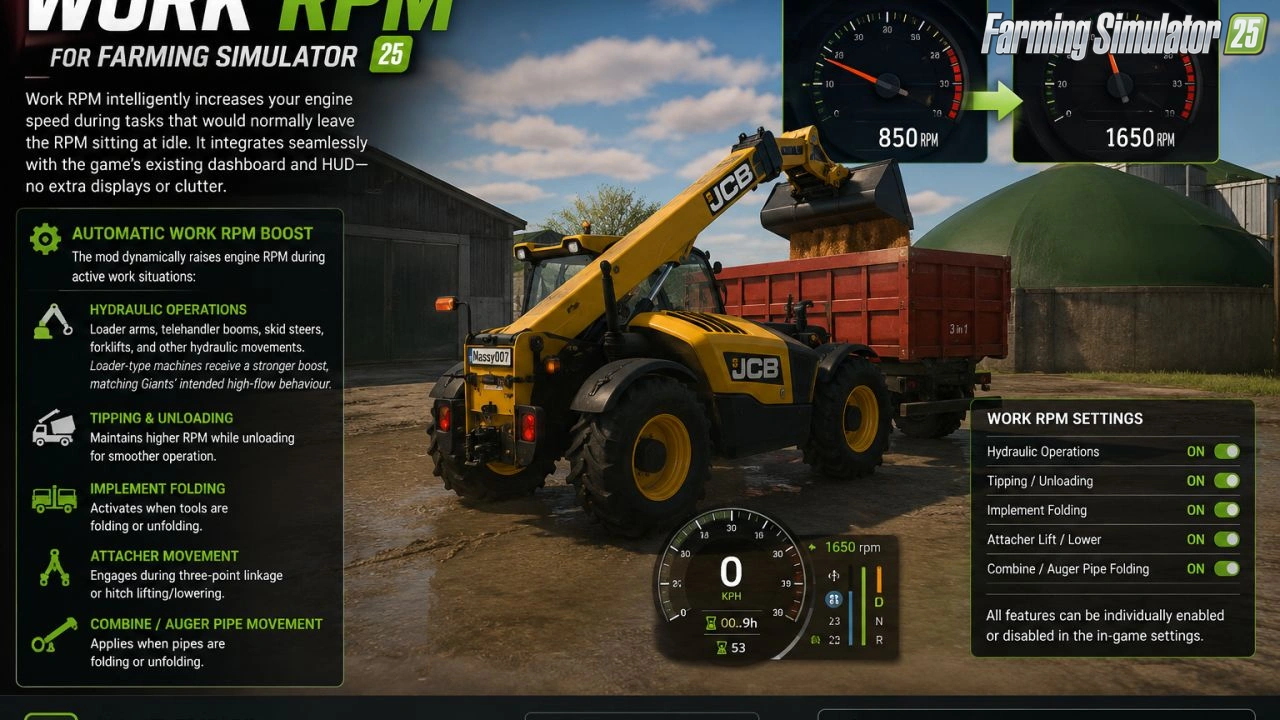
RPM Work Mode for FS25 - this mod intelligently increases your engine RPM during work tasks that would normally leave the engine idling, providing smoother operation for hydraulic movements, tipping, folding, and other activities without extra HUD clutter.
Features of RPM Work Mode:
– Automatic Work RPM Boost during active work situations
– Hydraulic Operations (loader arms, telehandler booms, skid steers, forklifts, etc.)
– Loader-type machines receive a stronger boost
– Tipping & Unloading with maintained higher RPM for smoother operation
– Implement Folding when tools are folding or unfolding
– Attacher Movement during three-point linkage or hitch lifting/lowering
– Combine / Auger Pipe Movement when pipes are folding or unfolding
– Full in-game settings integration with toggle options for each category
– Console commands for complete control
– Multiplayer compatible
– 10 language support
– Save game compatible
– Works on manual / hand-push tools and various vehicle types
Tested on game version 1.21+
Screenshots of «RPM Work Mode v2.4.4.5 for FS25»

Gameplay Videos with «RPM Work Mode v2.4.4.5 for FS25»
Changelogs for «RPM Work Mode v2.4.4.5 for FS25»
Changes in v2.4.4.5:
- Fixed settings getting stuck on NO and refusing to go back to YES 😂
- Settings no longer reload from disk every time you open the menu
- Toggle states now read correctly
- HUD now properly disappears when removed/disabled instead of deciding it lives there permanently
- Fixed the solid white settings box
- Fixed dark row colours not being applied properly
- Fixed missing l10n/translation labels
- Fixed vehicles not revving correctly
- Restored PTO / tach lift
- Fixed conflicts with Yield Control and additional Game Settings
- Made settings, HUD and motor hooks safer
- Fixed telehandler/front-loader RPM getting stuck at max after hydraulics stop
Changes in v2.4.4.1:
## New
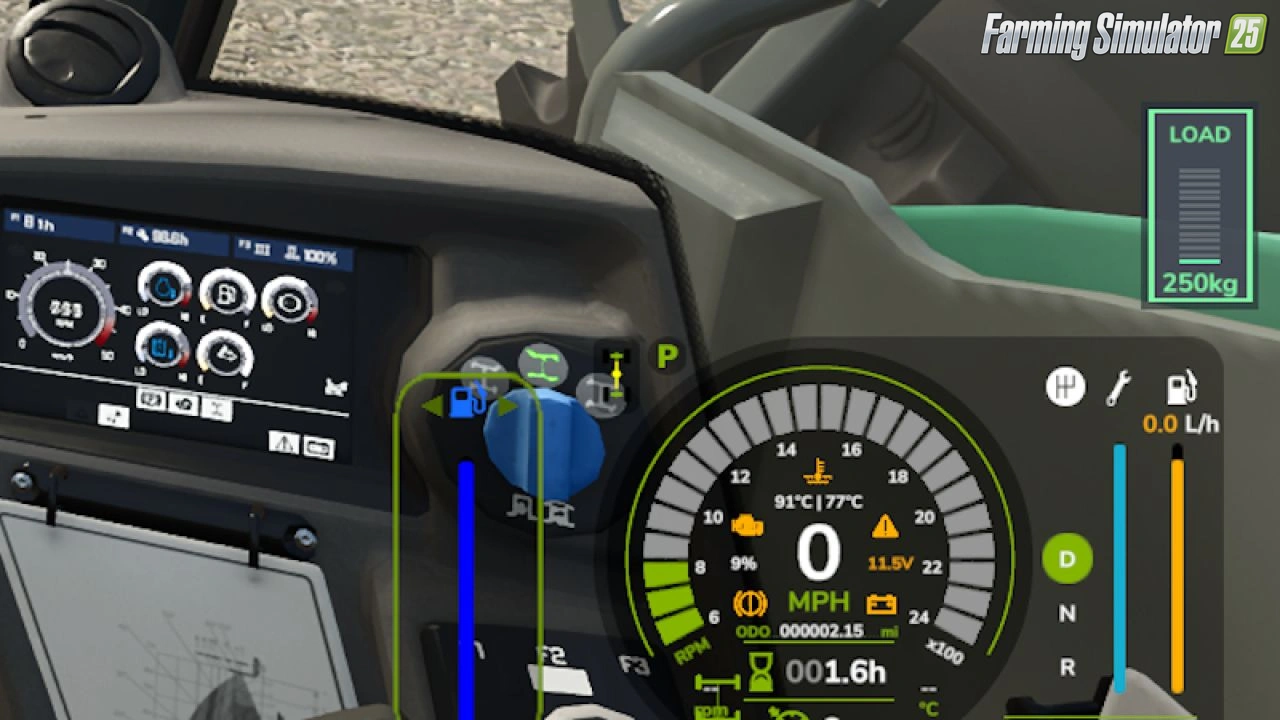
* Added a new LOAD readout to the speedometer HUD for telehandlers and loaders.
* Displays the live boom load in kg or tonnes.
* Supports pallet forks, buckets and grab*.
* Pallet forks now display the actual load weight, as they do not use a fill percentage.
* Load indicator changes colour based on the current load:
* 🟢 Green: Light load
* 🟠 Orange: Heavy load
* 🔴 Flashing red: Overload
* Added a vertical LOAD gauge, styled to match the stock fuel and damage bars.
* Added a WORK RPM badge while automatic RPM boost is active.
* Added separate **Game Settings** options for both new HUD features.
* Added support for Kramer, Manitou, Merlo and other similar telehandlers.
## Fixed
* Fixed pallet forks showing no load on the HUD.
* Fixed the LOAD display overlapping the gear icon.
* Fixed the LOAD display appearing off-screen or incorrectly positioned on the cab dashboard.
* Fixed Game Settings potentially disabling both HUD options when opened and saved.
* Fixed tipper RPM boost continuing after the trailer was fully opened. Boost now only operates while the trailer is opening or closing.
* Fixed various issues across the mod that could prevent features from working correctly.
* The entire mod should now be fully functional and working as intended.** 🎉
* Yes... it actually works properly now. 😂
## Improved
* LOAD display is now positioned alongside the speedometer bars instead of underneath the instrument cluster.
* Empty loader and telehandler booms now continue to display 0 kg, keeping the LOAD readout visible at all times.
* Improved load-limit feedback for clearer monitoring while operating machinery.
* General stability and compatibility improvements across the mod.
Changes in v2.4.2:
New
- Works on manual / hand-push tools, not just normal drivable vehicles.
- Works properly on manual gearbox tractors.
- Works on tools that only have an on/off start, without a full engine.
- Mod icon converted to icon.dds (fixes texture warnings in the log).
Fixed
- Other mods loaded after this one now get WorkRpm on their vehicles too.
- RPM boost no longer gets wiped out by the game engine each frame.
- Tractor plus front loader: boost and hold now follow attached tools.
- Attached tools no longer lose RPM between hydraulic movements.
- Hand push tools no longer boost when nobody is nearby.
- Settings no longer reload from disk for every vehicle on the map.
- Boost logic only runs on the server in multiplayer.
- Store category lookup no longer reads invalid vehicle XML paths (log spam fixed).
- FIX Lagging of game
Improved
- Boost works when you are in the tractor cab, even if the work is on an attached tool.
- More vehicle types supported; trains and conveyor belts still excluded.
Download Link 1
How to install «RPM Work Mode v2.4.4.5 for FS25»
- Download the modClick a download link below and save the
.zipfile to your computer. - Open the mods folderGo to
My Documents > My Games > FarmingSimulator2025 > mods. Create it if it doesn't exist. - Copy the .zip fileMove the downloaded
.zipstraight into themodsfolder. Do not extract it. - Launch FS25Start Farming Simulator 25, open Mods in the menu, find «RPM Work Mode v2.4.4.5 for FS25» and enable it.
- PlayStart a new save or load an existing one. The mod is now active. Enjoy! 🌾
Download Links — Policy & Disclaimer
This page may contain links to third-party content and websites. External links are reviewed when a page is published, however we are not responsible for the content of external websites. All mod files belong to their respective authors. FarmerPlayer is not affiliated with GIANTS Software GmbH. If you would like a link to your website removed, please contact us.
You Might Also Like
-
 v1.8.x
John Deere 90 Skid Steer Loader v1.0 for FS25
v1.8.x
John Deere 90 Skid Steer Loader v1.0 for FS25
-
 v1.14.x
Skid Steer Loader 711 Pack v1.0.0.1 for FS25
v1.14.x
Skid Steer Loader 711 Pack v1.0.0.1 for FS25
-
 v1.14.x
Riverbend Springs Map v1.0.1.4 Edit By Stevie for FS25
v1.14.x
Riverbend Springs Map v1.0.1.4 Edit By Stevie for FS25
-
 v1.10.x
Stara and Connect Modding Pack v1.0 for FS25
v1.10.x
Stara and Connect Modding Pack v1.0 for FS25
-
 v1.20.x
Hinterkaifeck Map v1.0 for FS25
v1.20.x
Hinterkaifeck Map v1.0 for FS25
-
 v1.10.x
Liftable Pallets And Bales v1.0.4 for FS25
v1.10.x
Liftable Pallets And Bales v1.0.4 for FS25
-
 v1.17.x
John Deere S600 Series Combine v1.1 for FS25
v1.17.x
John Deere S600 Series Combine v1.1 for FS25
-
 v1.19.x
SKY Agriculture Pack to add 12 Machines for FS25
v1.19.x
SKY Agriculture Pack to add 12 Machines for FS25
Download links lead to external third-party websites. FarmerPlayer.com does not host any mod files directly. All links are reviewed before publishing, however we cannot guarantee the content of external sites at all times. By clicking a download link you agree to our Privacy Policy and Terms & Conditions. If you encounter a broken or suspicious link, please use the Report button above.